Best AI Video Extender Tools in 2026: How to Extend Short Clips Without Reshooting
It has happened to almost every video creator: you shoot a great clip, but it ends just a little too early. Maybe the subject is still moving, the camera angle is perfect, or you simply need a few extra seconds to make the transition smoother.
Normally, you might slow down the footage, freeze the last frame, repeat a section, or even reshoot the scene. But what if you could simply let AI continue the video for you?
That is where an AI video extender comes in. If you search for video extender ai tools, you will find platforms that use generative AI to continue exixting footage.
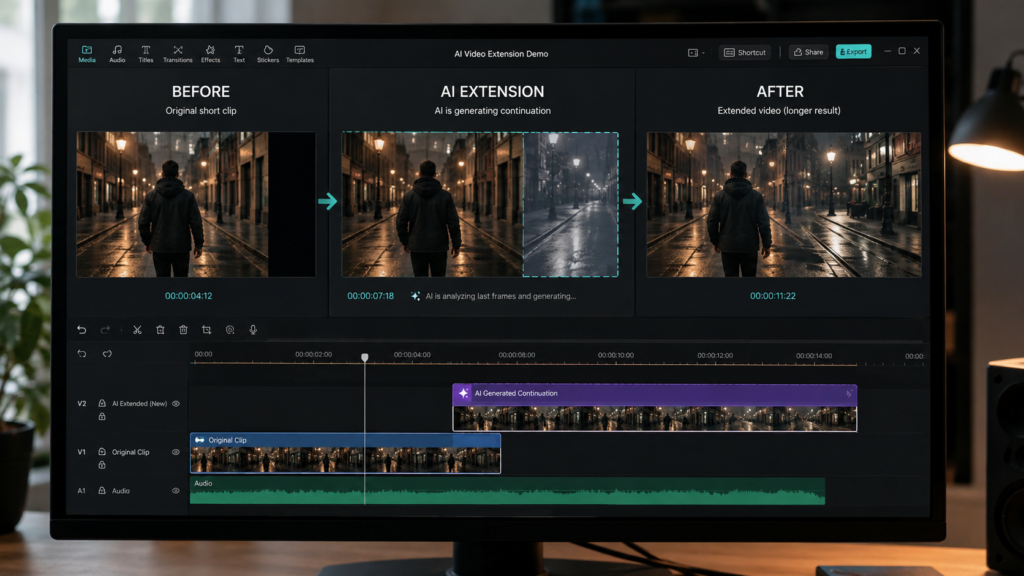
Modern AI video extension tools can analyze your existing footage and generate new frames that continue the scene while trying to match the original movement, lighting, subject, camera angle, and background. Some tools also allow you to use a text prompt to guide what should happen next.
In this guide, we’ll look at some of the best AI video extender tools in 2026, including free AI video extender options, browser-based tools, and more advanced platforms for professional creators.

Table of Contents
What Is an AI Video Extender?
An AI video extender is a generative AI tool that makes an existing video longer by creating new frames that continue the original footage.
Instead of simply repeating the final frames or freezing the screen, the AI analyzes elements such as subject movement, camera direction, lighting, and background details. It then generates additional footage designed to connect naturally with the original clip.
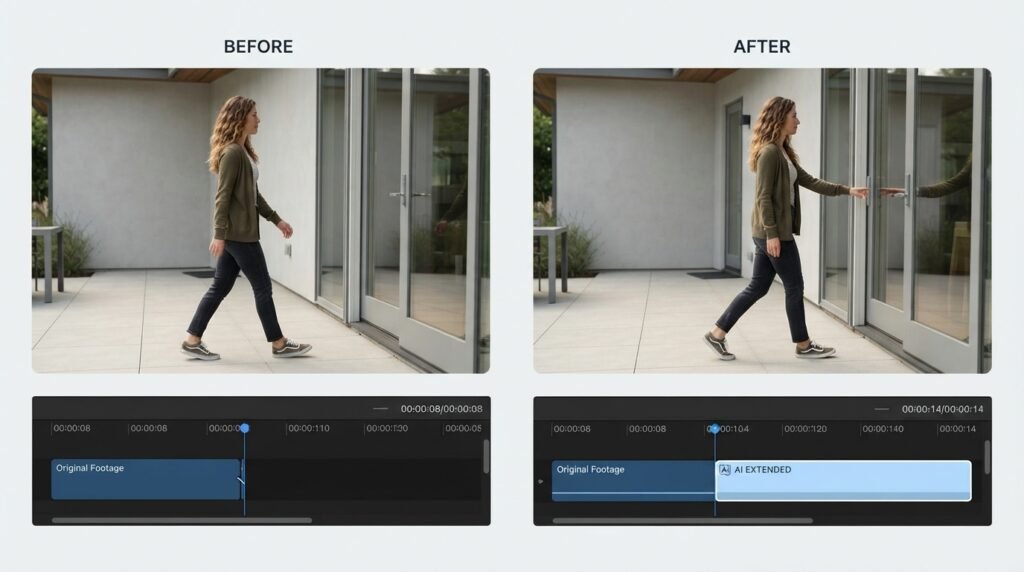
For example, imagine your video ends while someone is walking toward a door. Instead of ending the shot immediately, an AI video extender can attempt to continue that movement for a few more seconds.
This can be especially useful when you have already finished filming and don’t want to reshoot an entire scene just because the clip is slightly too short.
How Does AI Video Extension Work?
Most AI video extender tools follow a fairly simple process:
- Upload your original video.
- The AI analyzes the footage, especially the ending.
- Choose how many additional seconds you want.
- Add a text prompt if the tool supports prompt-based extension.
- Generate the continuation.
- Review the result and download the extended clip.
The quality of the result depends heavily on the original footage. A clear subject, consistent lighting, and relatively stable movement generally give the AI more information to work with.
A Quick Tip From Real Editing
If your first few AI video extensions look strange, don’t immediately assume that the tool is bad.
The prompt can make a big difference. Instead of giving the AI a vague instruction such as “continue the video,” describe the next movement clearly and keep the instruction relatively short.
For example:
Continue the subject walking forward while keeping the same camera angle, lighting, and background.
A simple, specific prompt is often easier for the model to follow.
Best AI Video Extender Tools in 2026
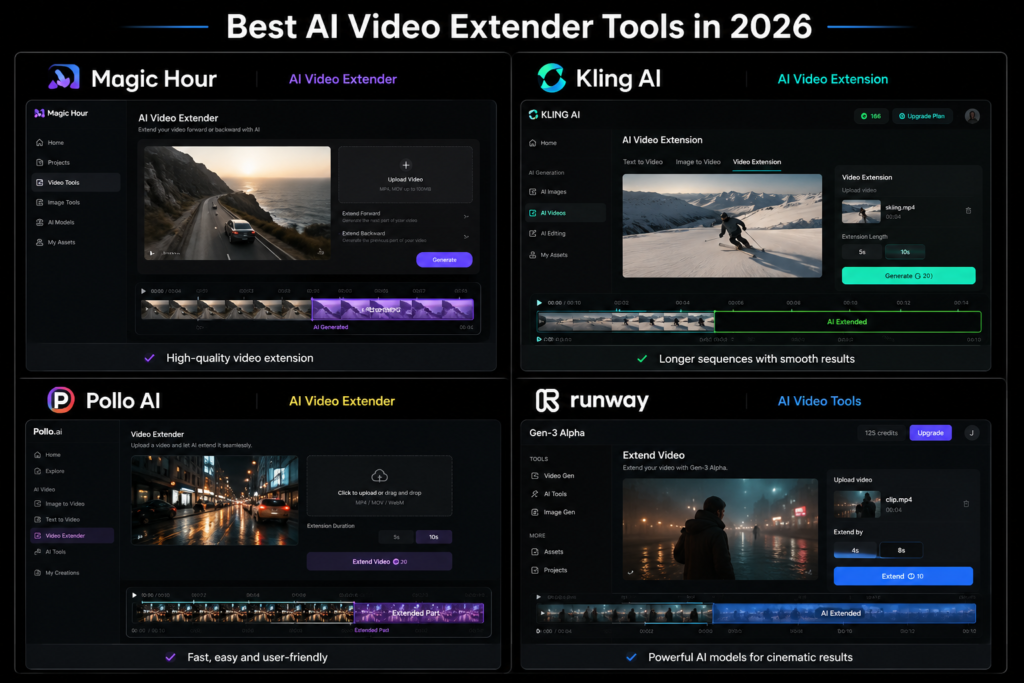
If you want a simple AI video extender free option that works directly in your browser, Magic Hour is one of the easiest places to start.
Its AI Video Extender can add up to 5 seconds to a clip. Its free option provides three 5-second extensions per day, and the basic free extender can be used without creating an account.
The workflow is straightforward: upload your clip, generate the extension, review the result, and download it.
Best for: Beginners, short-form creators, quick social media edits, and anyone who wants to test an AI video extender for free.
The Good:
- Simple browser-based workflow
- Free option available
- Basic free use without an account
- Useful for adding a few extra seconds quickly
The Bad:
- A 5-second limit may feel short for larger projects
- Complex movement can sometimes produce imperfect results
Kling AI Best for Longer AI Video Extensions
If you’re working on cinematic videos or want to build a longer AI-generated sequence, Kling AI is worth considering.
Its video extension workflow includes automatic continuation as well as a customized option that allows creators to guide the next action with a text prompt.
Kling’s extension workflow can add several seconds at a time, making it useful when you want to build a longer sequence rather than simply fix a few seconds at the end of a clip.
Best for: Cinematic videos, storytelling, AI-generated sequences, and creators who want more prompt control.
The Good:
- Automatic and customized extension options
- Text-prompt control
- Suitable for longer AI-generated sequences
- Useful for narrative-driven projects
The Bad:
- Complex scenes can sometimes produce inconsistent results
- The interface may take some time for beginners to understand
Pollo AI Best for a Simple Online Workflow
Pollo AI offers a browser-based AI video extender designed to continue an existing clip while keeping the generated footage visually connected to the original.
You can upload your video, add an optional prompt describing what should happen next, generate the continuation, and download the result.
This makes it a convenient option if you don’t want to install complicated video-editing software.
Best for: Beginners and creators who want a straightforward online video extension workflow.
The Good:
- User-friendly interface
- Prompt-based control
- Browser-based workflow
- Designed to maintain visual continuity
The Bad:
- Usage depends on available credits and plans
- Complex footage can sometimes produce unexpected results
Runway Best for Professional Creative Workflows
Runway is aimed more at creators who want a broader AI video editing and generation ecosystem rather than a single-purpose video extender.
Its platform includes AI-powered video tools that can help creators work with existing footage and generate additional visual content. It also offers features related to frame expansion and changing aspect ratios.
However, it is important to understand the difference: video extension adds new footage to the timeline, while frame expansion generates additional content around the existing frame.
Best for: Professional creators, filmmakers, advanced editors, and users who want a wider AI video toolkit.
The Good:
- Broad creative ecosystem
- Advanced AI video capabilities
- Useful for professional workflows
- More creative control
The Bad:
- Steeper learning curve
- Many advanced features require credits or paid plans
AI Video Extender vs. Traditional Video Editing
AI video extension isn’t the only way to make a short clip last longer. Traditional editing techniques can still be useful depending on the project.
| Method | Best Used For |
|---|---|
| AI video extension | Generating new continuation footage |
| Slow motion | Making existing movement last slightly longer |
| Freeze frame | Creating a pause or stylized ending |
| Looping | Repeating an existing action |
| Manual editing | Combining or trimming different clips |
The biggest difference is that an AI video extender generates new footage, while traditional editing techniques generally work with footage you already have.
If you don’t have enough footage to fill a gap, AI video extension can be particularly useful.
How to Extend a Video With AI
If you’re trying an AI video extender for the first time, you don’t need a complicated workflow.
Step 1: Choose the Right Clip
Start with footage that has clear movement, reasonable lighting, and a recognizable subject.
Very chaotic camera movement or scenes with lots of rapidly changing objects can be harder for AI models to continue naturally.
Step 2: Upload Your Video
Open your preferred AI video extender and upload the original clip.
Check the platform’s supported file formats, video length, and size limits before generating.
Step 3: Decide What Should Happen Next
Some tools automatically continue the scene, while others let you describe the next action using a prompt.
Keep your prompt simple and focused on what should happen immediately after the original clip.
For example:
“Continue the subject walking forward with the same lighting, camera angle, and background.”
Step 4: Generate the Extension
Start the generation and wait for the AI to create the additional footage.
Don’t worry if the first result isn’t perfect. AI video generation can require a few attempts, especially with complicated scenes.
Step 5: Check the Continuity
Watch the point where the original footage ends and the AI-generated footage begins.
Pay particular attention to:
- Faces
- Hands
- Body movement
- Objects
- Background details
- Lighting
- Camera movement
If something looks unnatural, try a shorter extension or adjust your prompt.
Step 6: Finish the Edit
Once you’re happy with the result, bring the extended clip into your regular video editor.
You can then adjust the aspect ratio, color, sound effects, music, captions, and transitions so the original and AI-generated footage feel more consistent.
What Makes a Good AI Video Extender?
Don’t judge an AI video extender only by how many seconds it can add.
The quality and usefulness of the generated footage matter much more.
Here are the main things to look for:
Continuity: Does the generated footage look like it belongs to the original scene?
Motion: Does the movement continue naturally?
Quality: Does the new footage maintain a similar level of detail?
Prompt control: Can you influence what happens next?
Speed: How quickly can you generate a usable result?
Free usage: Can you test the tool before paying?
Ease of use: Can a beginner understand the workflow without spending hours learning it?
Are Free AI Video Extenders Worth Using?
Yes, especially if you only need to add a few seconds.
A free AI video extender can be useful for testing the technology, fixing an abrupt ending, extending social media content, or experimenting with different ideas before paying for a subscription.
However, free plans usually have limitations. These can include:
- Fewer generations
- Shorter extension lengths
- Limited credits
- Lower usage limits
- Output restrictions
For occasional editing, a free plan may be enough. If you’re creating videos regularly, a paid plan may provide more flexibility.
Common Problems With AI Video Extension
AI video extension has improved significantly, but it isn’t perfect.
Depending on the tool and your original footage, you may sometimes notice:
- Altered facial features
- Unnatural hand or body movements
- Background elements changing
- Inconsistent camera movement
- Objects appearing or disappearing
- Lighting changes
- A noticeable transition between the original and generated footage
The easiest way to reduce these problems is to start with a clean clip and request a relatively short, logical continuation.
AI Video Extension vs. Video Outpainting: What’s the Difference?
Video extension means generating additional footage before or after the existing clip to make the video longer.
Video outpainting or frame expansion means generating additional visual content around the edges of the existing frame. This can be useful when changing the aspect ratio or expanding the visible scene.
For example, if you have a vertical video and want to create a wider composition, frame expansion may be useful. If your video simply ends too early, video extension is the more relevant solution.
Final Verdict: Which AI Video Extender Should You Choose?
There isn’t one best AI video extender for every project.
If you want a quick and free way to add a few seconds to a clip, Magic Hour is a convenient starting point.
If you’re creating longer, story-driven AI sequences and want prompt-based control, Kling AI is worth testing.
If you prefer a simple browser-based workflow, Pollo AI is another useful option.
And if you’re looking for a broader professional AI video ecosystem, Runway offers a much larger creative toolkit.
The best approach is to test the same short clip with a few different tools and compare the results. Look at continuity, motion, quality, generation limits, prompt control, and ease of use rather than choosing a tool simply because it promises the longest extension.
Frequently Asked Questions
What is the best AI video extender?
The best option depends on what you’re trying to create. Magic Hour is useful for quick free extensions, Kling AI is suited to longer AI-generated continuations, Pollo AI offers a simple online workflow, and Runway provides a broader professional AI video toolkit.
Can I extend a video with AI for free?
Yes. Some platforms offer free AI video extension with limited generations or credits. Magic Hour, for example, offers a free option with limited daily extensions.
How much can an AI video extender add?
The amount varies by platform. Some tools add only a few seconds at a time, while others allow you to generate repeated extensions to build a longer sequence.
Does AI video extension reduce video quality?
It can. Complex movement, unclear details, or major changes in a scene may cause visible inconsistencies. Starting with clear footage and requesting a shorter continuation can help improve the result.
Can AI extend any video?
Not necessarily. Each platform has its own supported formats, video limits, and generation requirements. The quality of your original footage also affects the final result.
Is AI video extension the same as video outpainting?
No. AI video extension adds new footage to the timeline, while video outpainting or frame expansion generates additional visual content around the existing frame.
Conclusion
AI video extenders offer a practical way to make short clips longer without going back to the camera and reshooting an entire scene.
Whether you need a few extra seconds for a social media video, want to fix an abrupt ending, or are building a longer AI-generated sequence, these tools can save time and give you more flexibility during editing. Testing different best ai video extender tools can help you find the option that’s fit your editing flow
For beginners, a free AI video extender is a good place to start. More advanced creators may prefer platforms with stronger prompt controls, longer extensions, and broader AI video editing capabilities.
Before settling on one tool, try the same short clip with a few different platforms. Compare the continuity, motion, quality, generation limits, and overall ease of use.
The best AI video extender isn’t necessarily the one that adds the most seconds it’s the one that gives you a continuation that actually looks like it belongs in your video.
Best Long Video to Short Video AI Tools in 2026: 10 Tools Comparedhttps://visiohiveaitools.com/best-long-video-to-short-video-ai-tools-2026/